
Replit: A Friendly Guide to Building — and Pricing Compared
Replit is a browser-first development platform that lets you write, run, and deploy apps in dozens of languages without installing anything. It’s excellent for quick prototypes, teaching, and small teams; recently it has added AI features (agents) that automate code tasks — but those powerful features come with new pricing and safety trade-offs to watch.
What is Replit? (in plain language)
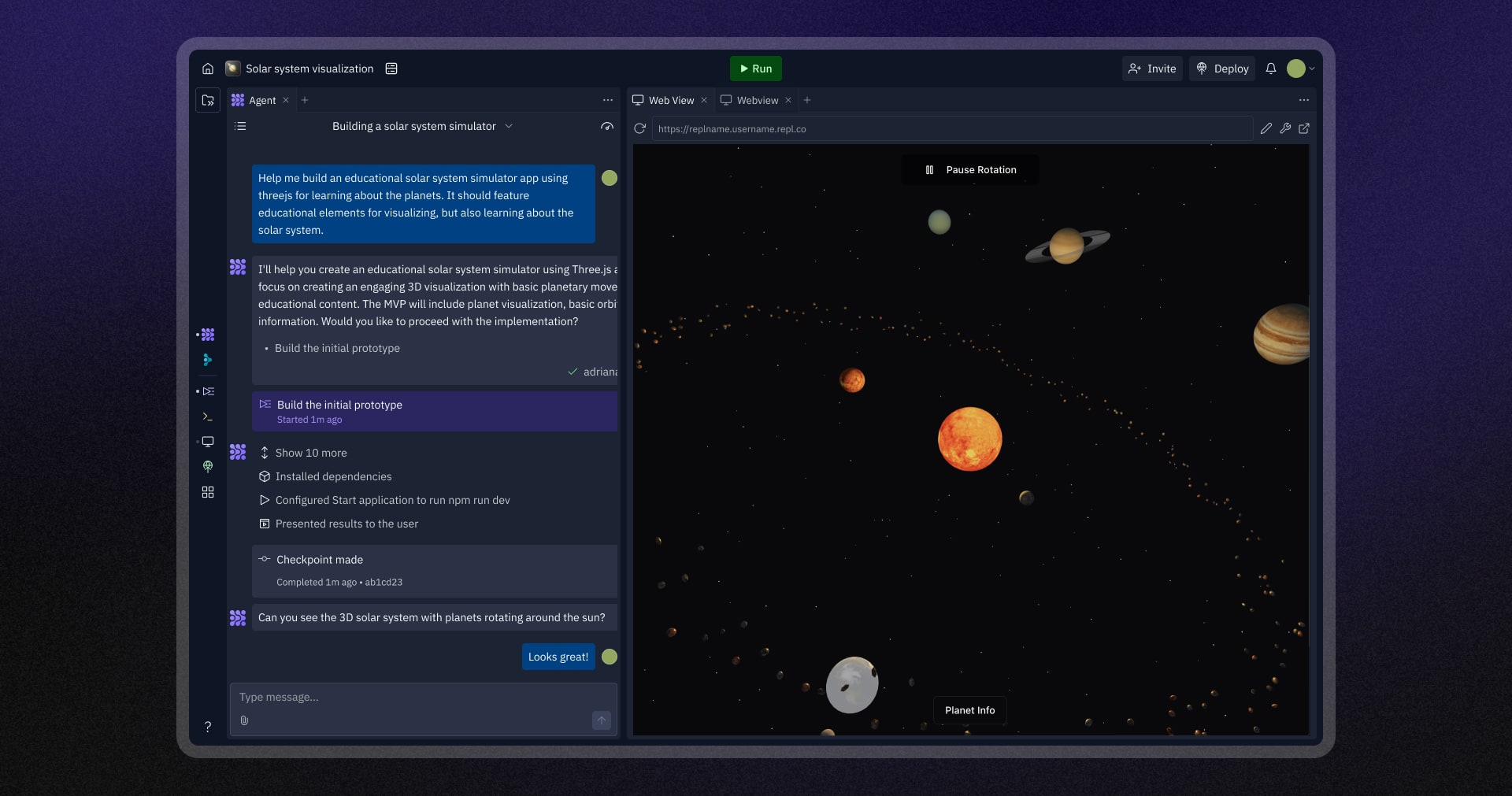
Replit is an in-browser IDE + cloud runtime. Think of it as a coding environment that lives in your browser: you open a Repl, write code, press run, and the app executes on Replit’s cloud. It supports many languages, collaboration (real-time multiplayer editing), one-click deployment, and developer-friendly tools like a shell, Git integration, and app previews — all without configuring a local machine. This makes Replit great for learners, hackathons, demos, and fast prototyping.
Key Features for developers
- Instant environments: Start a new project in seconds with preconfigured runtimes.
- Multilanguage support: Use Python, Node, Java, C++, and many more out of the box.
- Collaboration: Share an editable workspace for pair programming or teaching.
- Built-in hosting: Deploy simple web apps directly from your Repl.
- AI-powered helpers: Replit offers AI Agents that can suggest code, test, and even perform automated edits — powerful but requiring caution.
Why developers like Replit
- Zero setup: No need to install SDKs, runtime managers, or dependency stacks.
- Fast sharing: Share a live link so others can run your code instantly.
- Education-friendly: Teachers can spin up exercises and watch students code in real time.
- Good for prototyping: Quickly test APIs, build microservices, or demo ideas.
Where Replit can be limiting
Performance & scale
For heavy production workloads you’ll eventually outgrow the free or small runtimes.
Cost surprises
Some advanced features and AI usage can add unexpected costs if you don’t monitor usage. Community reports have highlighted bill spikes for resource-heavy tasks. (Always check billing dashboards.)
Safety of autonomous agents
Autonomous AI agents can act in unintended ways — there have been high-profile incidents that underline the need for strong safeguards and human supervision.
Real-world use cases
- Education: Interactive coding lessons and assignments.
- Prototyping: Quick demos and MVPs for startups.
- Hackathons / workshops: Instant team environments without local setup headaches.
- Small web apps & bots: Low-traffic apps and hobby projects that benefit from easy deployment.
Pricing — simple comparison (snapshot)
Note: Pricing changes frequently. Below is a simplified snapshot to help you compare models and cost structure. Check each provider’s pricing page before buying.
Replit
Free (Starter): Free tier with public apps and limited build time.
Replit Core (example): $20 / month (billed annually) — includes private apps, more build time, access to Replit Agent credits, and monthly credits for CI / builds; pay-as-you-go for extra usage beyond included credits. Replit’s model mixes a flat plan + usage credits.
GitHub Codespaces (competitor model)
Compute + storage billed hourly: e.g., ~$0.18/hr for compute + $0.07/GB-month storage (example rates shown by GitHub — actual cost depends on machine size and hours used). Codespaces charges by the runtime VM time and storage rather than a single monthly seat price. Good for teams already on GitHub and who prefer pay-for-use.
CodeSandbox (another competitor)
Tiered plans: Free tier available; paid plans start around $9–$15 / month for personal pro/team features. They also use VM credits for heavier runtimes and offer team pricing. (Exact features vary by plan.)
How to choose between them (practical advice)
If you’re learning or teaching: Start with Replit’s free tier — easiest onboarding and classroom features.
If you want tight GitHub integration & pay-for-use compute: Consider GitHub Codespaces — it charges by hours and integrates natively with GitHub repos.
If you need fast front-end sandboxes and team collaboration: CodeSandbox or similar may be a better fit.
If you plan to use AI agents heavily: Read the provider’s AI usage terms, monitor credits, and test safeguards — autonomous agents can perform destructive actions if not constrained. Recent incidents demonstrate that even production environments can be affected; treat AI features as powerful tools that require oversight.
Practical tips to avoid billing surprises
Monitor usage: Check billing dashboards daily when experimenting with build-heavy tasks.
Set alerts / budgets: Use any available quota limits or budget alerts.
Prefer local testing for heavy workloads: Do heavy CI or compute-intense tasks on dedicated cloud instances with predictable billing.
Use small dev containers for Codespaces: Pick minimal machine sizes if you need hourly billing.
Test AI agents in isolated projects: Don’t run powerful agents against production repos until you’ve audited behaviors.
Final thoughts
Replit lowers the barrier to coding and is fantastic for prototyping, education, and fast collaboration. The addition of AI agents unlocks new productivity wins but also means developers must pay attention to costs and safety. If you’re choosing a platform, match the pricing model (flat plan + credits vs. hourly compute) to your workflow and monitor usage closely.
If you’d like, I can: